On this page
Revised Article — Why I Added Classic Mode to Boussen OS
In my previous post, I talked about how I built Boussen OS and why I decided to make my portfolio work like a desktop.
But after someone actually tried it, I started thinking about something I hadn't considered before.
He entered Interactive Mode, opened Projects, looked through my work, and then went to About to read more about me.
After exploring the OS, he gave me an interesting point.
He asked me to imagine he was someone from a company looking at my portfolio. Would he really have the time to open different windows, search for my projects, and navigate the OS just to find my information?
Or would he prefer a normal portfolio where everything was already on one page?
I understood what he meant. Someone from a company might only want to check my work quickly, without spending time exploring the whole OS.
He suggested making a normal, static portfolio instead.
Why I Added Classic Mode
I started thinking about his suggestion, but I didn't want to remove Boussen OS.
I still wanted people to explore the interactive experience and see what I had built.
So I thought, why not have both?
That's when I decided to add Classic Mode.
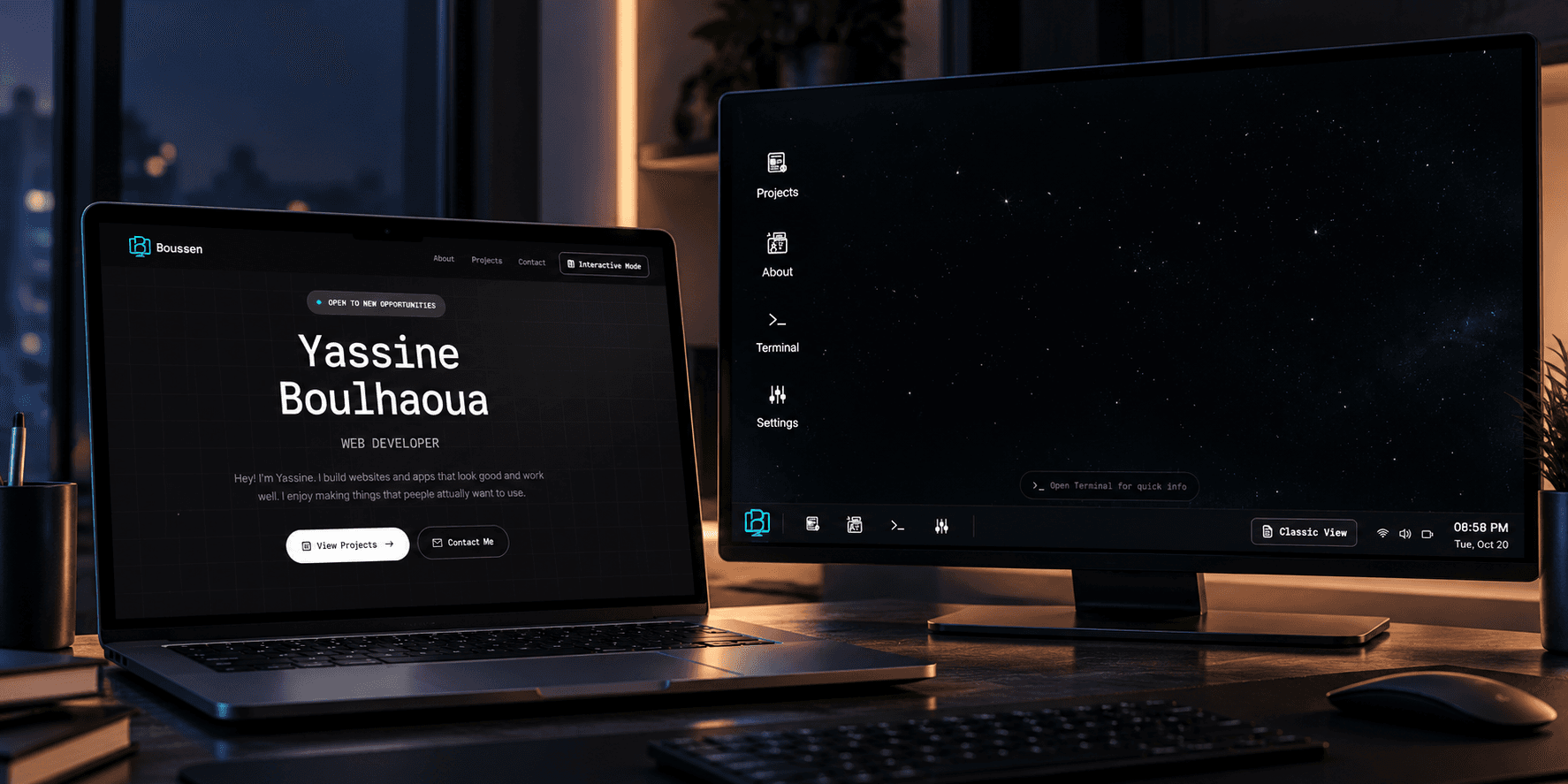
It's a simple version of my portfolio. Instead of opening different windows, visitors can scroll down and find the information they need.
Projects, About, and the other information are available in a normal portfolio layout.
But I also added an Interactive Mode button.
If someone is interested in exploring the OS, they can click that button and enter Boussen OS directly.
They can open windows, explore my projects, and interact with the system.
Making Classic Mode the Default
I also decided to make Classic Mode the default experience.
Now, when someone visits boussen.me, they see the Classic Mode first.
They can quickly check my projects and read my information without having to figure out how the desktop works.
And if they're interested in seeing more of what I can build, they can switch to Interactive Mode.
That's the idea I wanted.
Someone who only needs my information can find it quickly. Someone who wants to explore the more creative side of my portfolio can do that too.
Why I Kept Both
I didn't add Classic Mode because I wanted to replace Boussen OS. I added it because I understood that not everyone visiting my portfolio would have the time to explore the whole OS.
If someone from a company visits my portfolio, they might just want to see my projects and learn more about me. They shouldn't have to open different windows or figure out how the OS works just to find that information. That's why I decided to make Classic Mode the default.
But I also wanted to keep the interactive experience I had spent so much time building. If someone likes what they see in Classic Mode and wants to discover more about what I can create, they can switch to Interactive Mode.
There, they can explore Boussen OS, open different windows, and see the design, structure, and interactions I worked on. It's another way for me to show my creativity and what I can build beyond a normal portfolio.
I didn't want to force everyone to use the OS, but I also didn't want to remove it just because some people prefer something simple.
I wanted people to find my work easily first, and if they're interested, they can explore more.
That's why I decided to keep both.